Ever wondered how websites stay fast, secure, and online even under massive traffic or cyberattacks? Meet Cloudflare — the invisible shield and turbocharger behind millions of websites. Let’s dive into what makes it a game-changer.
What Is Cloudflare and Why It Matters

Cloudflare is more than just a content delivery network (CDN). It’s a comprehensive web performance and security platform that sits between your website and the internet. By acting as a reverse proxy, Cloudflare intercepts all incoming requests, filtering out threats and optimizing content delivery.


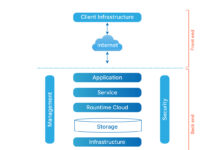


How Cloudflare Works: The Reverse Proxy Model
When a user visits a website protected by Cloudflare, their request doesn’t go directly to the origin server. Instead, it’s routed through Cloudflare’s global network of data centers. This allows Cloudflare to cache static content, block malicious traffic, and serve pages faster from a location closer to the user.
- Requests pass through Cloudflare’s edge servers first.
- Malicious traffic (like DDoS) is filtered before reaching your server.
- Static assets are cached globally for faster delivery.
“Cloudflare operates at the edge, meaning it’s closer to users than traditional hosting setups, drastically reducing latency.” — Cloudflare Official Documentation
Key Benefits of Using Cloudflare
The value proposition of Cloudflare spans performance, security, and reliability. Whether you run a small blog or a global SaaS platform, Cloudflare offers tangible improvements.
- Improved Page Load Speed: Through global CDN and optimization features like Auto Minify and Brotli compression.
- DDoS Protection: Built-in mitigation for layer 3, 4, and 7 attacks, even on the free plan.
- Zero-Configuration SSL: Free SSL/TLS certificates with automatic renewal via Universal SSL.
- Bot Management: Identifies and blocks bad bots while allowing search engines and good crawlers.
Cloudflare’s Global Network Infrastructure
One of Cloudflare’s biggest strengths lies in its massive, distributed network. As of 2024, Cloudflare operates in over 300 cities across more than 100 countries, making it one of the largest networks on the internet.
Edge Computing and Data Center Distribution
Cloudflare’s edge network ensures that content is served from a location geographically close to the end user. This reduces latency and improves load times significantly. Each data center runs the full suite of Cloudflare services — from caching to security filtering.
- Over 300 global locations ensure low-latency access.
- Edge servers run Cloudflare Workers, enabling serverless computing at the edge.
- Network handles over 100 million HTTP requests per second on average.
How Cloudflare Routes Traffic Efficiently
Cloudflare uses a combination of Anycast routing and intelligent load balancing to direct traffic to the nearest and least congested data center. This not only improves speed but also enhances resilience during outages or attacks.
- Anycast spreads traffic across multiple locations using the same IP address.
- Load balancers monitor server health and route traffic accordingly.
- Argo Smart Routing optimizes the path between Cloudflare and the origin server, reducing latency by up to 30%.
Cloudflare Security Features That Protect Your Site
Security is at the core of Cloudflare’s mission. From stopping DDoS attacks to preventing data breaches, Cloudflare offers a multi-layered defense system accessible even to non-technical users.
DDoS Protection: Built-In and Automatic
Distributed Denial of Service (DDoS) attacks can cripple websites by overwhelming them with fake traffic. Cloudflare automatically detects and mitigates these attacks in real time.
- Layer 3 & 4 protection stops volumetric attacks (e.g., UDP floods).
- Layer 7 protection defends against HTTP/S floods targeting web applications.
- No configuration needed — protection is active as soon as Cloudflare is enabled.
According to Cloudflare’s DDoS report, the company mitigates an attack every 17 seconds on average.
Web Application Firewall (WAF)
The Cloudflare WAF protects web applications from common exploits like SQL injection, cross-site scripting (XSS), and file inclusion attacks. It uses customizable rules and managed rule sets from sources like OWASP.
- OWASP Core Rule Set (CRS) blocks known vulnerabilities.
- Custom rules allow fine-tuned control over traffic filtering.
- Rate limiting prevents brute force attacks on login pages.
“With Cloudflare’s WAF, businesses can deploy enterprise-grade security without hiring a dedicated security team.” — TechCrunch, 2023
Bot Fight Mode and Advanced Bot Protection
Not all bots are bad, but malicious bots can scrape content, perform credential stuffing, or skew analytics. Cloudflare offers tiered bot protection:
- Bot Fight Mode (Free): Blocks obvious bot signatures.
- Super Bot Fight Mode (Pro+): Uses machine learning to detect sophisticated bots.
- Bot Management (Enterprise): Provides detailed bot analytics and granular control.
Performance Optimization with Cloudflare
Beyond security, Cloudflare dramatically improves website performance. Faster sites lead to better user experience, higher SEO rankings, and increased conversions.
Content Delivery Network (CDN) and Caching
Cloudflare’s CDN stores static assets (images, CSS, JS) across its global network. When a user requests a page, these assets are served from the nearest edge location.
- Automatic caching of static content reduces origin server load.
- Supports cache everything rules for dynamic content.
- Cache Reserve backs up cached content in AWS S3 for disaster recovery.
Learn more about caching strategies at Cloudflare’s caching documentation.
Image Optimization with Cloudflare Images
Images often account for 60%+ of a webpage’s size. Cloudflare Images provides automatic resizing, format conversion (e.g., to WebP), and lazy loading.
- On-demand image resizing without storing multiple versions.
- Automatic format selection based on browser support.
- Integrates with Cloudflare CDN for fast delivery.
Speed Enhancements: Argo, Rocket Loader, and Mirage
Cloudflare offers several proprietary technologies to accelerate websites:
- Argo Smart Routing: Optimizes the path between Cloudflare and your origin server, reducing latency.
- Rocket Loader: Defers JavaScript loading to speed up page rendering.
- Mirage: Delivers responsive images faster by prioritizing above-the-fold content.
Argo alone can reduce page load times by up to 30%, according to Cloudflare’s performance case studies.
Cloudflare for Developers: Workers, Pages, and APIs
Cloudflare isn’t just for website owners — it’s a powerful platform for developers. With serverless computing and edge APIs, it enables building fast, scalable applications.
Cloudflare Workers: Serverless at the Edge
Cloudflare Workers allow you to run JavaScript, Rust, or C code at the edge without managing servers. This enables dynamic content personalization, A/B testing, and API routing with ultra-low latency.
- Runs on the same network as Cloudflare’s CDN and security stack.
- Supports durable objects for stateful applications.
- Pricing based on requests and compute time — free tier available.
Explore Workers at workers.cloudflare.com.
Cloudflare Pages: JAMstack Hosting
Cloudflare Pages is a Git-connected platform for deploying static sites and JAMstack applications. It integrates with GitHub, auto-deploys on push, and serves sites from the edge.
- Free SSL, global CDN, and instant cache purging.
- Preview deployments for every pull request.
- Supports frameworks like Next.js, Nuxt, and Svelte.
APIs and Developer Tools
Cloudflare provides robust APIs for automating DNS, firewall rules, and analytics. The API is RESTful, well-documented, and supports token-based authentication.
- Automate DNS record updates.
- Integrate WAF rules into CI/CD pipelines.
- Fetch real-time analytics and security events.
Full API docs: api.cloudflare.com.
Cloudflare DNS: Fast, Secure, and Private
Cloudflare’s 1.1.1.1 DNS service is one of the fastest and most privacy-focused public DNS resolvers available. It’s designed to make internet browsing faster and more secure.
Why 1.1.1.1 Is the Fastest DNS
DNS resolution is the first step in loading any website. Cloudflare’s DNS uses Anycast routing and a minimal codebase to return responses in under 10 milliseconds on average.
- Global Anycast network ensures proximity to users.
- Minimalist design reduces processing overhead.
- Supports DNS over HTTPS (DoH) and DNS over TLS (DoT) for encrypted queries.
Privacy Commitments: No Logging Policy
Unlike many ISPs and DNS providers, Cloudflare does not log user IP addresses when using 1.1.1.1. This commitment was audited and verified by KPMG.
- Anonymous DNS queries — no personal data stored.
- Audit reports publicly available.
- Part of the “Why 1.1.1.1?” initiative to improve internet privacy.
“We designed 1.1.1.1 to be the privacy-first DNS service for everyone.” — Matthew Prince, Co-Founder & CEO of Cloudflare
Setting Up Cloudflare DNS on Devices
Configuring 1.1.1.1 is simple:
- Windows: Change DNS in Network Settings to 1.1.1.1 and 1.0.0.1.
- macOS: System Settings > Network > DNS > Add 1.1.1.1.
- Mobile: Use the Cloudflare 1.1.1.1 app (iOS/Android) for easy setup and WARP integration.
Cloudflare Pricing: Free vs Pro vs Enterprise
Cloudflare offers a generous free plan and scalable paid tiers for growing businesses.
Free Plan: What You Get
The free plan includes essential features that many small to medium sites need:
- Basic DDoS protection
- Shared SSL certificate
- CDN and caching
- Basic WAF rules
- DNS management
- 1.1.1.1 DNS access
Perfect for blogs, portfolios, and small business websites.
Paid Plans: Pro, Business, and Enterprise
Paid plans unlock advanced features:
- Pro ($20/month): Enhanced WAF, Argo Smart Routing, faster cache purging.
- Business ($200/month): Additional DDoS protection, faster support, bot management.
- Enterprise (Custom pricing): SLA guarantees, custom rules, advanced analytics, and dedicated support.
Compare plans at Cloudflare’s pricing page.
Is Cloudflare Worth the Upgrade?
For high-traffic sites, e-commerce platforms, or applications handling sensitive data, upgrading is often worth it. Features like Argo, advanced WAF, and bot management can prevent downtime and revenue loss.
- Argo can reduce bandwidth costs and improve user retention.
- Advanced WAF blocks zero-day exploits with faster rule updates.
- Enterprise SLAs ensure uptime guarantees for mission-critical apps.
Common Use Cases and Real-World Applications
Cloudflare is used by everyone from indie developers to Fortune 500 companies. Here are some real-world applications:
E-Commerce Sites: Speed and Security Combined
Online stores use Cloudflare to protect against payment fraud, DDoS attacks during sales, and to accelerate product pages.
- WAF blocks attempts to exploit checkout vulnerabilities.
- CDN ensures fast image loading for product galleries.
- Bot management stops scrapers from stealing pricing data.
Content Publishers: SEO and Ad Performance
News sites and blogs benefit from faster load times, which improve SEO rankings and ad revenue.
- Google uses page speed as a ranking factor — Cloudflare helps meet Core Web Vitals.
- Faster ad delivery increases viewability and CPMs.
- DDoS protection prevents blackouts during breaking news events.
Developers and Startups: Rapid Deployment
With Cloudflare Pages and Workers, startups can deploy full-stack applications without managing infrastructure.
- Zero-config deployments from GitHub.
- Serverless backend logic with Workers.
- Global reach from day one.
What is Cloudflare used for?
Cloudflare is used to improve website speed, security, and reliability. It provides DDoS protection, a global CDN, a web application firewall (WAF), DNS services, and developer tools like serverless computing and static site hosting.
Is Cloudflare free to use?
Yes, Cloudflare offers a robust free plan that includes essential features like CDN, basic DDoS protection, shared SSL, and DNS management. Paid plans add advanced features like Argo Smart Routing, enhanced WAF, and bot management.
How does Cloudflare improve website speed?
Cloudflare improves speed through its global CDN, which caches content closer to users, and performance features like Argo Smart Routing, Brotli compression, and image optimization. This reduces latency and accelerates page loads.
Can Cloudflare stop DDoS attacks?
Yes, Cloudflare automatically mitigates DDoS attacks at layers 3, 4, and 7. It blocks malicious traffic before it reaches your origin server, with protection active even on the free plan.
What is 1.1.1.1 by Cloudflare?
1.1.1.1 is Cloudflare’s public DNS resolver, designed to be the fastest and most privacy-focused DNS service. It supports DNS over HTTPS (DoH) and DNS over TLS (DoT) and does not log user IP addresses.
Cloudflare has redefined how websites handle performance and security. From its powerful global network to developer-friendly tools like Workers and Pages, it offers a complete ecosystem for building fast, secure, and scalable web experiences. Whether you’re a blogger, developer, or enterprise, Cloudflare provides tools that grow with your needs — often starting for free. By leveraging edge computing, intelligent routing, and proactive threat detection, Cloudflare ensures your site stays online, fast, and protected no matter what.
Recommended for you 👇
Further Reading:
